Text Areas
A
text area can display multiple lines of text. When the text extends beyond the borders
of the widget, the user can view it by manipulating vertical and horizontal
scroll bars. The next screen shot
shows an interaction with a program that displays a schedule of earnings for an
investment. The code for this
program is in the file textareademo.py.
|
|
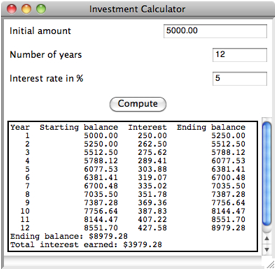
The
text area is added to this window is the usual manner:
# Add the text area to the window (in __init__)
self.outputArea = self.addTextArea("",
row = 4, column = 0,
columnspan = 2,
width = 50, height = 15)
Note
that the text area stretches across two columns in the last row, and has a
width and height specified in characters.
Scroll bars allow the user to view text that extends beyond the visible
boundaries of the text area.
An
important attribute of a text area is wrap, whose value is NONE by default.
This means that a line of text can continue beyond the right border of
the text area without wrapping around to the next line. The other possible values of wrap are WORD
and CHAR (all of these
values are tkinter constants).
The text area in the example program leaves wrap off.
The
event handler method for the Compute
button takes the inputs from the fields and produces an output string to
display in the text area.
def compute(self):
"""Computes
the investment schedule based on the inputs."""
#
Obtain and validate the inputs
startBalance = self.amount.getNumber()
rate
= self.rate.getNumber() / 100
years
= self.period.getNumber()
if startBalance
== 0 or rate == 0 or
years == 0:
return
totalInterest = 0.0
#
Set the header for the table
result
= "%4s%18s%10s%16s\n" % ("Year", "Starting
balance",
"Interest", "Ending
balance")
# Compute
and append the results for each year
for year in
range(1, years + 1):
interest
= startBalance * rate
endBalance = startBalance
+ interest
result += "%4d%18.2f%10.2f%16.2f\n"
% \
(year, startBalance,
interest, endBalance)
startBalance = endBalance
totalInterest += interest
# Append
the totals for the period
result
+= "Ending balance: $%0.2f\n" % endBalance
result
+= "Total interest earned: $%0.2f\n"
% totalInterest
self.outputArea.setText(result)
In
addition to the getText and setText methods, the TextArea class includes an appendText method, which adds text to the end of the existing
text rather than replacing it.